
Master Tenebris Somnia controls: movement, interaction, inventory, combat, and controller support on every platform.
Tenebris Somnia Controls Guide
Tenebris Somnia uses direct character movement with a context interact input, an inventory screen for combining items, a run input for escapes, and real time weapon swings. Full controller support is confirmed on Steam and gamepad play is recommended, while exact default keyboard bindings have not been officially published ahead of the October 16, 2026 launch.
- Move Julia directly around each room, interact near objects, and manage items through the inventory menu.
- Keep a weapon equipped and use the run input to break contact with monsters.
- Full controller support is confirmed, so pad players can buy with confidence.
Control Scheme at a Glance
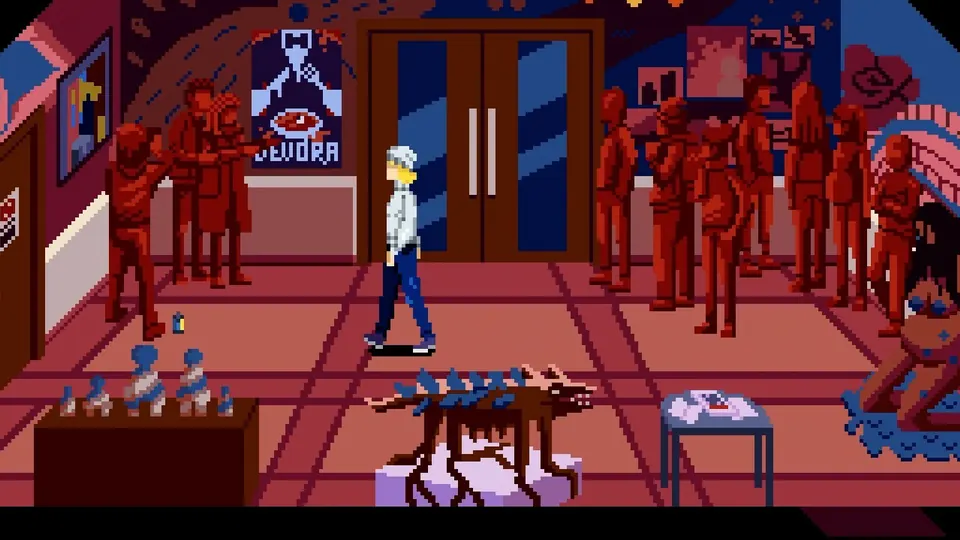
Tenebris Somnia is not a point and click game in the literal mouse cursor sense. You steer Julia herself through side scrolling rooms, walk up to furniture and doors, and trigger interactions contextually. The verified action set, drawn from the demo and press coverage, covers movement, interaction, inventory management, item combining, weapon equipping and swinging, and running.
| Action | What it does | Status |
|---|---|---|
| Move | Walk Julia through rooms | Confirmed in demo |
| Interact | Examine, pick up, open, talk | Confirmed in demo |
| Inventory | Open menu, inspect and combine items | Confirmed in demo |
| Equip and swing weapon | Melee attack with wrench and others | Confirmed by press |
| Run | Sprint away from danger | Confirmed by press |
| Menu and pause | Check health portrait and options | Community reported |
Official source: Tenebris Somnia on Steam
Because the developers have not published a bindings chart, memorize the verbs rather than specific keys for now. Our Tenebris Somnia Beginner's Guide covers how these verbs chain into the core loop.
PC Keyboard and Mouse
On PC the game supports both keyboard input and full controllers. The Steam feature list explicitly includes full controller support alongside single player and Family Sharing, and catalogue data describes gamepad as recommended. That makes PC the most flexible platform: keyboard for precise inventory work, pad for couch style movement and combat.
No official default keyboard map has been released, so do not trust any bindings chart you see before launch unless it cites the demo or the finished game directly. When the full game lands on October 16, 2026, check the in game settings screen first, then remap interact and run to whatever your fingers reach fastest. Mouse usage, if any, has also not been detailed, and demo reports describe gamepad style interaction rather than cursor clicking.
Any site listing exact PC keys for Tenebris Somnia before launch is guessing. Learn the action list on this page, then confirm the real defaults in the launch build.
Pair this page with Tenebris Somnia Settings Guide for display and performance tuning on PC.
PlayStation 5 Controls
The PlayStation 5 edition supports offline play for one player with Remote Play enabled, per the official PlayStation Store concept page. DualSense specifics such as haptic feedback or adaptive trigger support for weapon swings have not been announced.
Expect the standard survival horror layout: left stick movement, a face button for interact, a shoulder or trigger input for attacking with the equipped weapon, and a menu button for the inventory and health portrait. These are genre conventions, not confirmed mappings, and this section will be updated with the real DualSense layout after launch.
Xbox Series X|S Controls
The Xbox demo is already playable with Play Anywhere support, 4K Ultra HD output, and handheld optimization, which makes Xbox the best place to feel the controls today. The Xbox store demo page confirms New Blood Interactive as publisher and Saibot Studios with Andres Borghi as developer.
Demo players on controller report spamming the interact button to find hotspots in cluttered rooms, which tells you two things: interaction is proximity based, and thorough room sweeps matter more than pixel hunting. Keep moving while sweeping interact near shelves, bodies, mirrors, and windows.
Walk the full perimeter of each room while tapping interact. Demo hotspots hide in mirrors, window boards, and small furniture you would otherwise walk past.
Nintendo Switch Controls
Tenebris Somnia launches on both Nintendo Switch and Switch 2 on October 16, 2026, digitally and physically. Physical editions come from Lost in Cult, whose Switch 2 edition is fully complete on cartridge rather than a game key card.
No Switch specific control details such as touch screen inventory support, HD Rumble, or Joy-Con versus Pro Controller layouts have been announced. Given the simple verb set, any standard controller layout will map cleanly. Handheld players should pay extra attention to small interactable details on the smaller screen and use the run input generously, since vampire tight rooms punish slow reactions.
Inventory and Interaction Flow
The inventory is where adventures are won. Demo players collect a glass, chemicals, documents, and tools, then combine them through the inventory screen. One widely discussed friction point is that the inventory cursor can slip between the item list and the journal tab, so move deliberately when selecting reagents for combinations.
The interaction flow for any puzzle object is: walk close, interact to examine, read the description, open the inventory if the description hints at a missing piece, combine candidate items, then use the result on the target. The famous demo puzzle chains a glass plus chemicals plus blood from a bathroom mirror plus sunlight from an unboarded window. Memorize that flow and the full game becomes a series of variations on it.
For puzzle solving habits built on this flow, see Tenebris Somnia Tips and Tricks and the room by room Tenebris Somnia Demo Walkthrough.
Combat Inputs
Combat inputs are minimal by design: equip a weapon, swing it, move between swings, run when overwhelmed. Press coverage confirms Julia can equip and swing a wrench with a dedicated run button for disengaging. The two-faced monsters fought in the demo are damaged by wrench hits, as shown in community footage titled around clobbering the creatures.
Official source: Tenebris Somnia on GOG
There is no confirmed lock on, dodge roll, or block input, so play spacing based combat: step in, swing, step out. Full spacing and weapon guidance lives in Tenebris Somnia Combat Guide, and item handling detail will live in the inventory guide.
Swing commitments leave Julia open. Time one hit, reposition, and only chain swings when the monster is staggered or recovering.
FAQ
Does Tenebris Somnia support controllers on PC? Yes. Full controller support is listed on Steam and gamepad play is described as recommended.
Can I remap the controls? Remapping options have not been officially detailed. Most New Blood releases include remapping, but treat this as unconfirmed until the launch build is verified.
Is there mouse support? Unconfirmed. Demo reports describe direct character control with contextual interaction rather than cursor clicking.
What are the exact default keyboard bindings? Not officially published. This guide will be updated with the real defaults after the October 16, 2026 launch.
Does the Switch version support touch controls? Unannounced. Assume standard button controls until the developers confirm otherwise.
Which controller should I use on PC? Any XInput compatible pad works with Steam Input. Players reporting the demo used standard gamepads without issues.
Related Guides
- Tenebris Somnia Beginner's Guide
- Tenebris Somnia Combat Guide
- Tenebris Somnia Settings Guide
- Tenebris Somnia FAQ
Each link above builds on inputs: starting advice, fighting technique, performance setup, and fast answers.
More Tenebris Somnia Guides
Complete Tenebris Somnia demo walkthrough: apartment arrival, chemical puzzle, monster fights, and FMV beats.
Who made Tenebris Somnia? Andres Borghi, Saibot Studios, New Blood Interactive, and the award-winning Argentine FMV crew facts.
Tenebris Somnia difficulty: no modes announced yet, so this guide covers demo challenge facts and launch prep.
Tenebris Somnia endings: no ending count is confirmed yet, so this guide covers the story setup and post-launch unlock plan.
All Tenebris Somnia enemies confirmed so far: the two-faced monster, Desiderium creatures, and cult foes, plus combat prep.
Tenebris Somnia exploration guide: Ivan's apartment, the Desiderium, room-clearing routes, and secrets for the demo and launch.
Tenebris Somnia FAQ: release date, platforms, demo, price, story, and system requirements answered.
How Tenebris Somnia FMV works: the Argentine film crew, practical effects, and pixel-to-film storytelling.